

Write your story and play it as you type.
A free visual novel maker for Windows. No code needed, and nothing for your players to install.
THE GAME PLAYS BESIDE THE EDITOR, IN UNDER A SECOND
About
-
Easy enough for anyone
Write lines, choices, and characters with buttons and forms. Your story plays from the first line, even before any art exists.
-
Open enough for coders
The same project is plain text with a command-line tool and git-friendly files. Extend it with your own statements.
-
Light enough for any PC
A finished game is about 3 MB before your art and music, and it starts with a double-click on Windows 10 or 11.
Features
FOR WRITERS
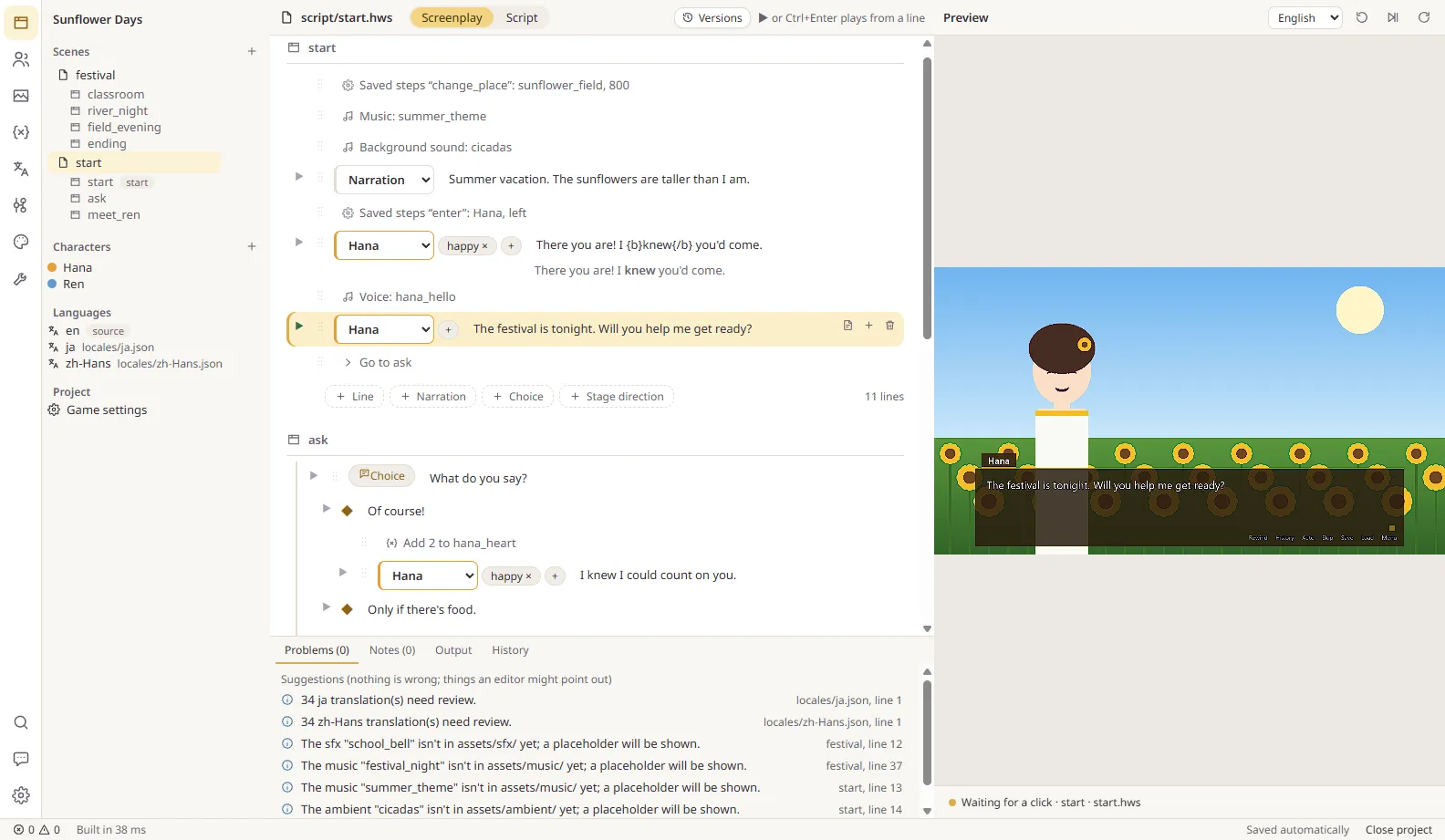
Each line of your story is a row.
Pick who speaks and how they look, then type what they say. Choices, music, and backgrounds come from menus and forms, never code.
- The game updates as you type
- Play from any line
- Autosave and a history of every change
FOR ARTISTS
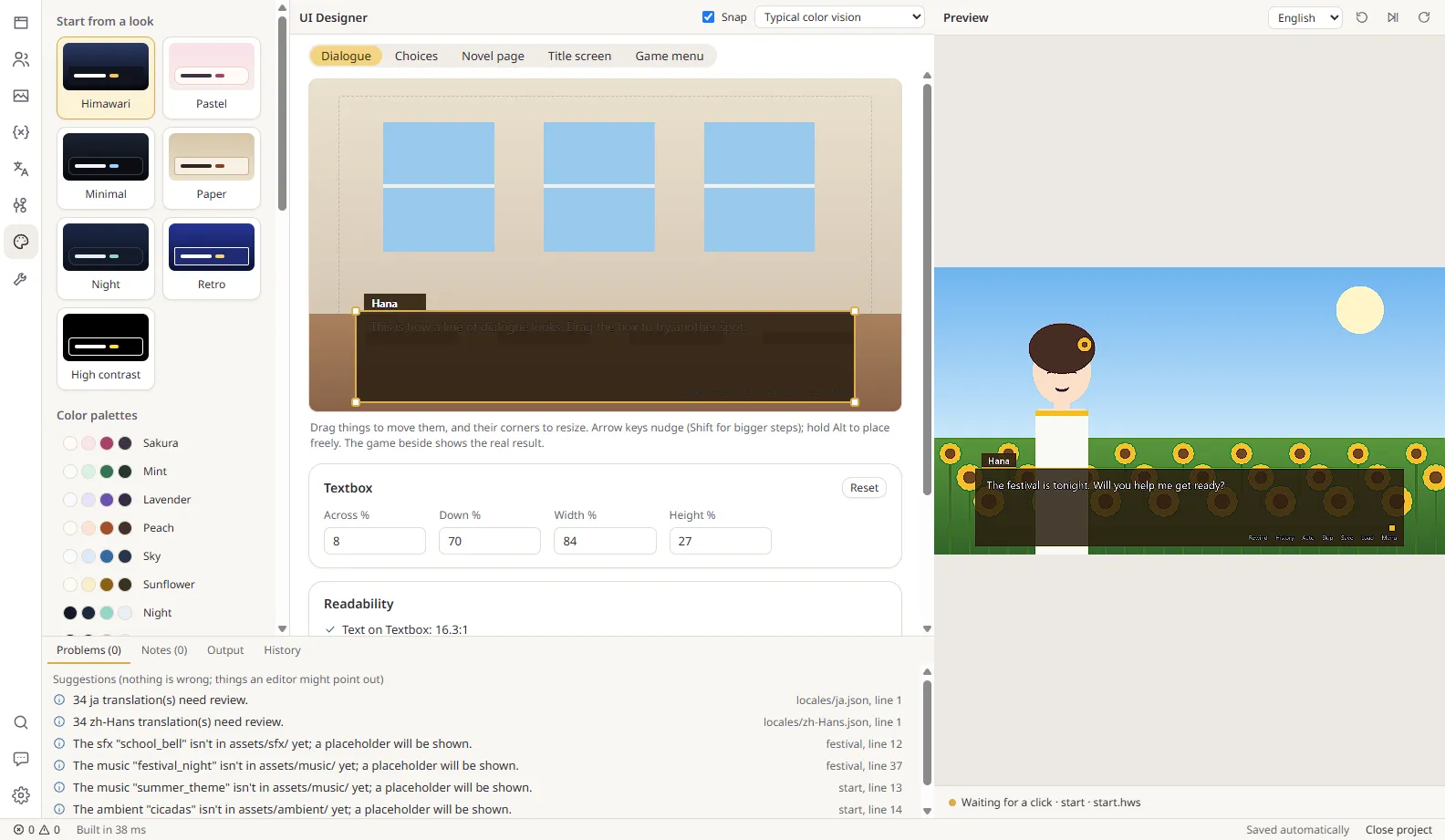
Make the menus look like your game.
Move, resize, and recolor the textbox, choices, and every menu right on the running game. Start from a preset and get a contrast check as you go.
- Layered sprites with blinking and lip-flap
- Import from Photoshop
- Seven presets and color palettes
FOR CODERS
Plain text you can read, diff, and script.
Scenes are .hws files in a small script language, and characters are Markdown. Studio, the command-line tool, and the AI tools share one compiler, so they always agree.
hwcchecks, builds, and playtests every path from a terminal or CI- Files that diff and merge cleanly in git
- Your own statements as macros, or in C
scene start:
    change_place(sunflower_field, 800)
    music summer_theme fade(1000)
    ambient cicadas fade(500)
    "Summer vacation. The sunflowers are taller than I am."
    enter(hana, left)
    hana happy "There you are! I {b}knew{/b} you'd come."
    voice hana_hello
    hana "The festival is tonight. Will you help me get ready?"
jump ask-
FOR TRANSLATORS
Add a language when you need it.
Every line gets a slot in a translation table. Export CSV or XLIFF for your own tools, and players switch language in the game's menu.
-
THE GAMES YOU SHIP
One button to export.
A folder or a single
.exewith your game's name and icon. Saves, rollback, a backlog, and accessibility settings are built in, and a finished game makes no network calls. -
OPTIONAL AI
AI help, only if you want it.
It's off until you turn it on, and everything can be done by hand. It drafts, proofreads, and translates text, and it never makes images, music, voices, or video.
COMING SOON
A visual novel made with Himawari is on the way.
Made by Moeko Works, with the engine you can download today. More when it's ready.
Download
Himawari Studio for Windows
Everything is inside the installer: the editor, the game engine, the command-line tools, the tutorial, and three sample games. You don’t need anything else.
Himawari runs on Windows PCs. Open this page on your computer to download it.
| Himawari Studio (the editor) | Games you export | |
|---|---|---|
| Windows | 10 or 11, 64-bit | 10 or 11, 64-bit |
| Disk space | About 500 MB | About 3 MB, plus your art and music |
| Graphics | Any; integrated graphics are fine | Any; falls back to software rendering without a graphics driver |
| Memory | 4 GB or more | Under 150 MB for a typical 1080p scene |
| Anything else to install | No | No |
Arm PCs running Windows 11 should work through its x64 emulation, but that hasn’t been tested yet.
If Windows warns you
The installer isn’t code-signed yet, so Windows SmartScreen may say “Windows protected your PC”. Choose More info, then Run anyway. Code signing is planned before version 1.0.
SHA-256 of the installer 7d4db9da24b8d1c2b214d56f42ed5160d805f1cee6c14f34222ce79a46939b55
Learn
-
Make your first game
A guided tutorial that builds a short game from an empty project.
-
Documentation
How-to guides and reference: export a game, add a language, credit Himawari.
-
Working with AI
Set up the built-in assistant or Claude Code, or leave AI off.
-
The script language
For coders: the language, bytecode, asset pack, and debug protocol specifications.
-
The source
The engine, Studio, the tools, and the tests, all on GitHub.
News
-
Himawari Studio 0.4.1 is out
Each sample now opens its own copy.
-
Himawari Studio 0.4.0, the first public build
Studio, the engine, and game export work from start to finish. Expect rough edges, and please report them.
Questions people ask
Do I need to know how to code?
No. Everything in Studio works through buttons, pickers, and forms. The script view is there if you want it.
Do players need to install anything?
No. An exported game is a folder, or a single file, that starts with a double-click on Windows 10 or 11.
Is it free? Can I sell my game?
Yes to both. Himawari is free and open source, and you can sell games made with it. The engine inside your game uses the zlib license, which doesn’t require crediting Himawari, though it’s appreciated (how to credit Himawari). Your story and art stay entirely yours.
Do I have to use AI?
No. AI is off until you turn it on, and every feature can be done by hand. See AI is optional.
Does Himawari send my work anywhere?
No. Studio and games have no servers, accounts, telemetry, or analytics. Text leaves your PC only if you turn on AI help and use it. See Privacy.
How does it compare to Ren’Py?
Ren’Py is mature and has a huge community. Himawari is aimed at people who’d rather not code at all, with a visual editor and a live preview built in. Its closed script language can also be checked and edited safely by tools, which the Python inside Ren’Py scripts makes hard. Ren’Py runs on more platforms; Himawari is Windows only for now.
Will there be a Mac or Linux version?
Linux is planned after 1.0. Other platforms depend on demand. See the roadmap.
Get involved
-
Report a problem
Use the Moeko Works contact page, or Settings → About → Report a problem in Studio.
-
GitHub issues
Say what you did, what you expected, and what happened instead.
-
Contributing
Where to start, and how changes to the specifications are decided.
-
Security
Please report security problems privately, not in a public issue.